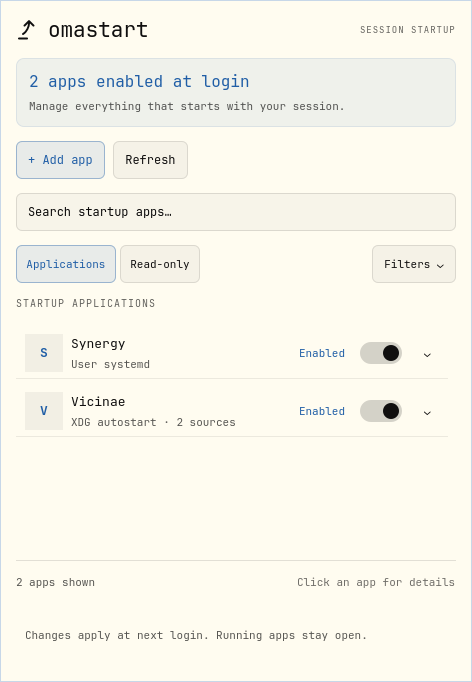
Find your apps.
Search by name, command, or source. Applications stay in place as you make changes; protected entries have a Read-only tab.
A little plugin for Omarchy Quattro
Manage everything that starts with your Omarchy session. One native panel for the apps you want waiting when you log in.
v0.2.1 Free & open source MIT
Your next session starts here.
No apps in this view.
Native to your desktopQuattro panel. Your Omarchy theme.
Room to change your mindLocal backups and reversible edits.
At home on your machineNo accounts. No telemetry.
01 / A calmer login
Three startup sources.
One place to understand them.
Search by name, command, or source. Applications stay in place as you make changes; protected entries have a Read-only tab.
Turn off all enabled startup methods together, or turn on one suitable method. Running apps stay open; changes apply at next login.
Added apps appear at the top. Disabled apps stay listed until you choose Remove in their details. Undo restores the entry.
02 / Everything in its place
Supported literal startup calls in your user configuration. Complex Lua stays visible and read-only.
autostart.lua
Desktop entries, per-user overrides, and an app picker. Generated services stay grouped with their app.
*.desktop
Supported user services, including globally enabled apps. Protected or indirect activation explains its limits.
*.service
A startup setting tells you what is configured for login. It does not tell you whether the app is running right now.
03 / Local by design
omastart reads your startup configuration and saves changes in your user directories. It doesn’t send your app list to a server.
Read the privacy policy04 / Make yourself at home
You’ll need Omarchy Quattro, Python 3.10+, systemctl,
and luac. Install as your normal desktop user.
Source ZIP · MIT licensed · No build step
SHA-256 checksum
# Extract the download, then open a terminal
# inside the
omastart-0.2.1 folder.
python3 scripts/install.py
# The panel is now in your bar.
# Your startup choices
are yours to make.
The installer validates and copies the plugin, backs up the previous installation, and enables the bar widget. It doesn’t change your startup apps. Prefer Git-managed updates? See the native Omarchy installation.
05 / A few good questions
No. omastart changes startup configuration and never starts, stops, or restarts your apps. Disabling a globally enabled systemd service uses a per-user mask, which also blocks later manual or indirect starts until restored.
Supported changes save a local recovery record. Undo restores the previous configuration if the affected files still match what omastart wrote. If you edit those files elsewhere, omastart preserves your newer work.
It supports three startup mechanisms: Hyprland, XDG autostart, and user systemd. Computed Lua, service templates, timers, sockets, and other complex activation remain protected. Login-shell scripts and app-internal startup settings are outside this version’s scope.
Yes. The installed plugin uses native Quattro controls, typography, and theme colors. This website’s Tokyo Night and Everforest palettes are a preview of the same desktop spirit.
Your startup preferences and recovery backups stay on your computer. Restore any startup settings you want to change before removing the plugin. The included README explains removal and backup locations.